Showing posts with label Java. Show all posts

Quick Sort in Java

Quick Sort in Java
In this tutorial we will discuss on of the most efficient and programmer's choice sorting called Quick Sort. Just like its counterpart sorting, Merge Sort, its also based on Divide and Conquer paradigm.

Just like merge() method is the key which merges the two equal halves in Merge Sort, Quick Sort has a method partition() which divides the list. This method places an element at its exact position in the list, and partition the list based on the index of the element. It continues to find the exact partition in the other two parts until all the elements are placed in its exact positions.

The algorithm can be summarized as below

quickSort(arr[], low, high)
{
    if (low < high)
    {
        /* pi is partitioning index, arr[pi] is now
           at right place */
        pi = partition(arr, low, high);

        quickSort(arr, low, pi - 1);  // Before pi
        quickSort(arr, pi + 1, high); // After pi
    }
}
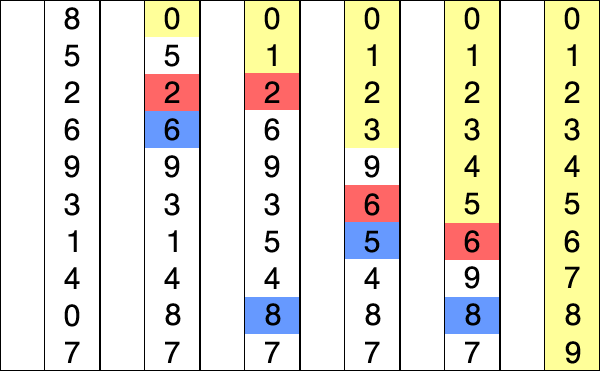
See the below image for better understanding
quicksort
Lets get hands on by writing a small Java code for Quick Sort.

import java.util.Arrays;

class QuickSort

{

    int partition(int arr[], int low, int high)

    {

        int pivot = arr[high];

        int i = (low-1);

        for (int j=low; j<high; j++)

        {

            if (arr[j] <= pivot)

            {

                i++;

                int temp = arr[i];

                arr[i] = arr[j];

                arr[j] = temp;

            }

        }


        int temp = arr[i+1];

        arr[i+1] = arr[high];

        arr[high] = temp;


        return i+1;

    }

    void mergeSort(int arr[], int low, int high)

    {

        if (low < high)

        {

            int pi = partition(arr, low, high);

            mergeSort(arr, low, pi-1);

            mergeSort(arr, pi+1, high);

        }

    }

    public static void main(String args[])

    {

        int arr[] = {10, 7, 8, 9, 1, 5};

        QuickSort qs = new QuickSort();

        System.out.println("Array before sort " + Arrays.toString(arr));

        qs.mergeSort(arr, 0, arr.length - 1);

        System.out.println("Array before sort " + Arrays.toString(arr));

    }
}

Analysis of Quick Sort

  • Time Complexity: O(nLogn) in all 3 cases (average and best) as merge sort always divides the array in two halves and take linear time to merge two halves.
  • Worst Case TC: O(n*n)
  • Worst Auxiliary Space: O(n)
  • Algorithmic Paradigm: Divide and Conquer
  • Sorting In Place: Yes
  • Stable: No


Hope you guys like it. Stay tune for more updates in sorting. Please comment for any doubts.
Happy Learning !!!
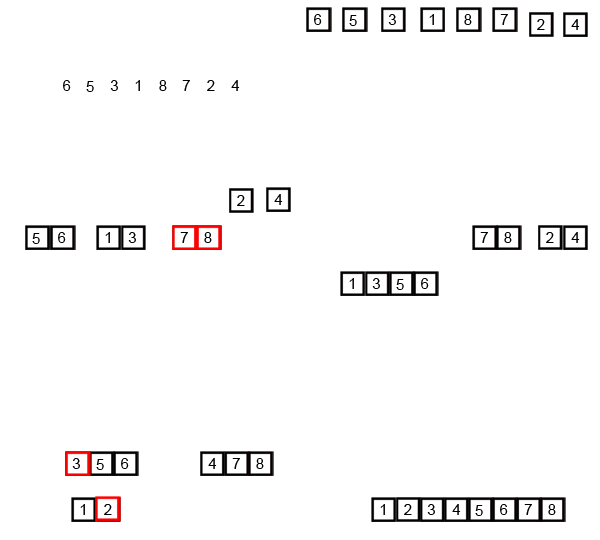
Merge Sort in Java

Merge Sort in Java
Till now we have discussed sorting algorithm which are though easy to code but are not really efficient when it comes to sorting a large set of objects e.g millions or billions of number. So we need some other algorithms we can be efficient in this case.
Till now the average time complexity of each sorting is O(n*n). Merge Sort has a complexity of O(nlog(n)) for average/worst case as well.

Merge Sort is based on divide and conquer algorithm. It divides the set in equal halves and sort each halves individually and then finally merge both the halves.

The algorithm can be summarized as below
MergeSort(arr[], left,  right)
If right > left
     1. Find the middle point to divide the array into two halves:  
             middle mid = (left+right)/2
     2. Call mergeSort for first half:   
             Call mergeSort(arr, left, mid)
     3. Call mergeSort for second half:
             Call mergeSort(arr, mid+1, right)
     4. Merge the two halves sorted in step 2 and 3:
             Call merge(arr, left, mid, right)
where merge() method is the key which merges the two equal halves assuming both are sorted.

Lets look at the below GIF for a better pictorial representation of Merge Sort

Merge-sort-example-300px.gif

So lets get hands on with Merge Sort by writing a Java Program as below.

import java.util.Arrays;


class MergeSort

{

    void merge(int arr[], int left, int mid, int right)

    {

        int n1 = mid - left + 1;

        int n2 = right - mid;


        int L[] = new int [n1];

        int R[] = new int [n2];


        for (int i=0; i<n1; ++i)

            L[i] = arr[left + i];

        for (int j=0; j<n2; ++j)

            R[j] = arr[mid + 1+ j];


        int i = 0, j = 0;

        int k = left;

        while (i < n1 && j < n2)

        {

            if (L[i] <= R[j])

            {

                arr[k] = L[i];

                i++;

            }

            else

            {

                arr[k] = R[j];

                j++;

            }

            k++;

        }

        while (i < n1)

        {

            arr[k] = L[i];

            i++;

            k++;

        }

        while (j < n2)

        {

            arr[k] = R[j];

            j++;

            k++;

        }

    }


    void mergeSort(int arr[], int l, int r)

    {

        if (l < r)

        {

            int m = (l+r)/2;

            mergeSort(arr, l, m);

            mergeSort(arr , m+1, r);

            merge(arr, l, m, r);

        }

    }


    public static void main(String args[])

    {

        int arr[] = {12, 11, 13, 5, 6, 7};

        MergeSort ms = new MergeSort();


        System.out.println("Array before sort " + Arrays.toString(arr));

        ms.mergeSort(arr, 0, arr.length-1);

        System.out.println("Array before sort " + Arrays.toString(arr));

    }

}
//output
//Array before sort [12, 11, 13, 5, 6, 7]
//Array before sort [5, 6, 7, 11, 12, 13]
Analysis of Merge Sort
  • Time Complexity: O(nLogn) in all 3 cases (worst, average and best) as merge sort always divides the array in two halves and take linear time to merge two halves.
  • Auxiliary Space: O(n)
  • Algorithmic Paradigm: Divide and Conquer
  • Sorting In Place: No in a typical implementation
  • Stable: Yes
Hope you like it. Stay tune for more interesting sorting algorithms.
Happy Learning !!!

Selection Sort in Java

Selection Sort in Java


Today we will discuss yet another sorting algorithm which also falls among the simplest and used heavily in beginner's level.
Selection Sort as the name suggests is based on the logic of finding the smallest elements among the compared elements in its phase.

Let me make it more clear by an example.

If given numbers are 2,5,3,4,1, in the first phase the smallest among the 5 numbers i.e 1 will be found and placed in the 1st position. In second phase we will compare the others elements and smallest among them i.e 2 will be placed in 2nd position. Like wise after the 5th phase all the 5 elements all being sorted.

You can also have a look on the below GIF for better understanding.


Let get hands on by writing a simple Java program to sort elements using Selection Sort.

import java.util.Arrays;

public class SelectionSort {

 public static void main(String[] args) {
        
        int arr[] = {12, 11, 13, 5, 6};
 
        SelectionSort ss = new SelectionSort();  
        System.out.println("Array before sort " + Arrays.toString(arr));
        ss.sort(arr);
        System.out.println("Array after sort " + Arrays.toString(arr));

 }

 private void sort(int[] list) {
  //First loop to change the index number
  for (int i = 0; i < list.length - 1; i++) {        // the last item doen't need to do the loop to compare
   // set the first item as index number
   int currentMin = list [i] ;
   int currentMinIndex = i;
   // second loop to do comparison with the number after it
   for (int j = i + 1; j < list.length; j++) { 
    // if there's number (that locates behind the index number) bigger than the index number
    if (currentMin > list [j] ) {

     // change the currenMin value to the new min number
     currentMin = list [j] ;

     // change the index
     currentMinIndex = j ;
    }
   } 
   // swap the value of the index number with the new min number
   if (currentMinIndex != i) {
    list [currentMinIndex] = list [i] ; 
    list [i] = currentMin ;
   }
  }
 }
}
Analysis of Selection Sort
  • Worst and Average Case Time Complexity: O(n*n). 
  • Best Case Time Complexity: O(n*n). Best case occurs when array is already sorted.
  • Auxiliary Space: O(1)
  • Sorting In Place: Yes
Hope you like it. Please stay tune as we will discuss some more interesting and efficient sorting algorithms in coming tutorial. Please comment on any doubts.

Happy Learning !!!

Insertion Sort in Java

Insertion Sort in Java
Insertion Sort is also one of the few simplest and easy sorting available like Bubble Sort.
The technique used here is the technique we use while playing cards. The way we pick cards from deck and arrange each card inserting each one in its position while we hold the cards in hand. That's how the name is derived from - "insertion".


Insertion Sort

Let us see the explanation of this sorting with the below gif.
Taking one element at a time we will place the elements in its position comparing each element till we find its perfect position.
Just Like Bubble sort, Insertion sort also uses two loops. First loop picks elements one by one, in second loop the element picked is compared and placed in its suitable position.


Let get hands on by writing a Java code for it.

import java.util.Arrays;

class InsertionSort
{
    void sort(int arr[])
    {
        for (int i=1; i < arr.length; ++i)
        {
            int key = arr[i];
            int j = i-1;
            while (j>=0 && arr[j] > key)
            {
                arr[j+1] = arr[j];
                j = j-1;
            }
            arr[j+1] = key;
        }
    }
 
    public static void main(String args[])
    {        
        int arr[] = {12, 11, 13, 5, 6};
 
        InsertionSort is = new InsertionSort();  
        System.out.println("Array before sort " + Arrays.toString(arr));
        is.sort(arr);
        System.out.println("Array after sort " + Arrays.toString(arr));
    }
}
//output
//Array before sort [12, 11, 13, 5, 6]
//Array after sort [5, 6, 11, 12, 13]
Analysis of Insertion Sort


  • Time Complexity: O(n*n)
  • Auxiliary Space: O(1)
  • Boundary Cases: Insertion sort takes maximum time to sort if elements are sorted in reverse order. And it takes minimum time (Order of n) when elements are already sorted.
  • Algorithmic Paradigm: Incremental Approach
  • Sorting In Place: Yes
  • Stable: Yes
Uses: Insertion sort is used when number of elements is small. It can also be useful when input array is almost sorted, only few elements are misplaced in complete big array.

Hope you like it. Stay tune for discussion for other sorting algorithms. Please comment for any doubts.
Happy Learning !!!

Complete Linked List with operations

Complete Linked List with operations
We have discussed the various concepts including the operations of Linked List in our previous post. So if you are unaware of these concepts, please visit our previous tutorials

Lets look at the complete Linked List creation in Java with all the operations we have discussed.
Here is the Java Code.
import org.omg.Messaging.SyncScopeHelper;

public class LinkedList {

 static LinkedNode head =  null;
 public static void main(String[] args) {
  LinkedList linkedList = new LinkedList();
  LinkedNode node = new LinkedNode(1);
  linkedList.addNode(node);
  LinkedNode node2 = new LinkedNode(2);
  linkedList.addNode(node2);
  LinkedNode node3 = new LinkedNode(3);
  linkedList.addNode(node3);
  System.out.println("After adding nodes, the list is -");
  linkedList.printList();
  int search = linkedList.searchNode(node3);
  System.out.println("Node 3 found in index " + search);
  linkedList.deleteNode(new LinkedNode(2));
  System.out.println("After deleting node 2 if present, the list is -");
  linkedList.printList();

 }

 private void deleteNode(LinkedNode node2) {
  if(head == null){
   System.out.println("List is empty");
   return;
  }
  if(head.value == node2.value){
   head = head.next;
   return;
  }else{
   LinkedNode temp1 = head;
   LinkedNode temp = head.next;
   while(temp != null && temp.value != node2.value ){
    temp1 = temp;
    temp = temp.next;
   }
   if(temp == null){
    System.out.println("The node to be delete is not found ");
   }else{
    temp1.next = temp.next;
   }
  }
 }

 private void printList() {
  if(head != null){
   LinkedNode temp = head;
   while(temp != null){
    System.out.print(temp.value + " ");
    temp = temp.next;
   }
   System.out.println();
  }else{
   System.out.println("The List is empty, Please add node elements first");
  }


 }

 private int searchNode(LinkedNode node2) {
  int position = 0;
  if(head == null){
   System.out.println("List is empty");
   return -1;
  }
  if(head.value == node2.value){
   System.out.println("Node found a position " + position);
   return -1;
  }else{

   LinkedNode temp = head;
   while(temp != null && temp.value != node2.value ){
    position++;
    temp = temp.next;
   }
   if(temp == null){
    System.out.println("Node found a position " + position);
    return -1;
   }
  }
  return position;
 }


 private void addNode(LinkedNode node) {
  if(head == null){
   head = node;
   return;
  }
  else{
   LinkedNode temp = head;
   while(temp.next != null){
    temp = temp.next;
   }
   temp.next = node;
  }
 }

}

class LinkedNode {
 protected int value;
 protected LinkedNode next;
 public LinkedNode(int value) {
  this.value = value;
  this.next = null;
 }

}

//output
//After adding nodes, the list is -
//1 2 3 
//Node 3 found in index 2
//After deleting node 2 if present, the list is -
//1 3 

That's all for Single Linked List. We will discuss about double linked list and circular linked list as part of our next tutorials. We will also discuss various interview questions related to these concepts.

Hope you like it. Please comment on any doubts.
Happy Learning !!!

Bubble Sort in Java

Bubble Sort in Java
Here we will discuss the most simplest sorting algorithm Bubble Sort which works repeatedly swapping of the adjacent elements if they are in wrong order.

The logic in Bubble Sort is to sort the elements pass by pass.
In each pass the elements are placed in its perfect positions starting from the last i.e the largest element is placed as the last element in the list in the 1st pass. Similarly, the second largest element is placed as the second last element in the element in 2nd pass, and so on.


Image result for bubble sort

As you can see (above fig.) in each pass higher elements are getting sorted first and elements looks like bubbling for one place to other, hence the name Bubble Sort.

Lets gets hands on with the algorithm by writing a Java code.
import java.util.Arrays;


public class BubbleSort {

 public static void main(String[] args) {
  int [] array = {5,2,1,7,4,9};
        System.out.println(Arrays.toString(array));
        bubbleSort(array);
        System.out.println(Arrays.toString(array));
        
 }
 private static int[] bubbleSort(int[] array) {
  for(int i = 0; i < array.length -1 ; i++){
   for(int j = 0; j < array.length - (1+i) ; j++){
    if(array[j] > array[j+1]){
     int temp = array[j+1];
     array[j+1] = array[j];
     array[j] = temp;
    }
   } 
  }
  return array;
 }

}
//output
//[5, 2, 1, 7, 4, 9]
//[1, 2, 4, 5, 7, 9]
Here sorting is for descending order. As you can see we have two loops.
One for loop is for the pass. The other for loop compares each adjacent element starting from the 0th position and swap whenever it's
array[j] > array[j+1]
So in each pass we are putting the higher elements one by one in the last.
with each pass the number of comparisons also decreases as you can see from the line
j < array.length - (1+i) 
i is incrementing thereby the traversal in second loop decrease by 1 in each pass. This is obvious because we have already placed the right elements in previous passes so no need to compare those elements.

Analysis of Bubble Sort
  • Worst and Average Case Time Complexity: O(n*n). Worst case occurs when array is reverse sorted.
  • Best Case Time Complexity: O(n). Best case occurs when array is already sorted.
  • Auxiliary Space: O(1)
  • Boundary Cases: Bubble sort takes minimum time (Order of n) when elements are already sorted.
  • Sorting In Place: Yes
  • Stable: Yes


Hope you like it. Stay tune as we will discuss and explain other interesting sorting algorithms in coming tutorial. Please comments for any doubts.

Happy Learning !!!
Introduction to Sorting, types of Sorting Algorithms

Introduction to Sorting, types of Sorting Algorithms
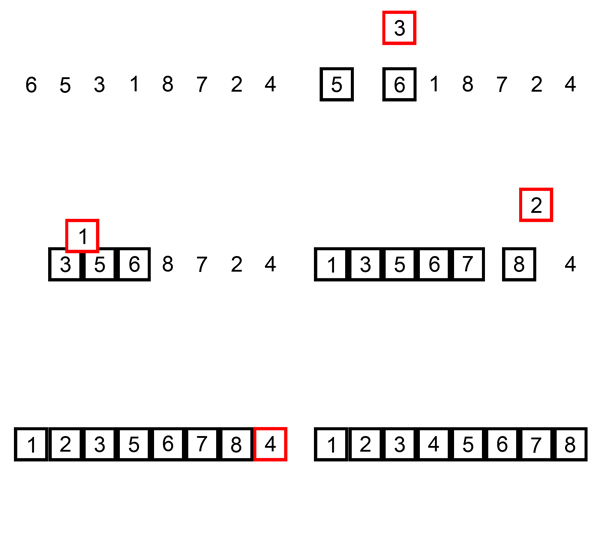
Sorting, as the name suggest, is use to arrange a series of data type (in computer science language) in either ascending or descending  order given the choice.

Data Type can be anything of integer, character, string or can be an object type itself.

Example:
Input : 3, 5, 1, 7, 9, 2
Output : 1, 2, 3, 5, 7, 9 (Ascending)

Input : 3, 5, 1, 7, 9, 2
Output : 9, 7, 5, 3, 2, 1 (Ascending)

In either case we have performed a sorting operation on a set of given numbers.

Sorting Techniques 

Based on situations (Time Complexity, Space Complexity, ease to use) we can use different techniques for sorting a given set. All techniques have their own pros and cons.
Some very common type sorting algorithms used in Computer Science are :
  • Bubble Sort
  • Insertion Sort
  • Selection Sort
  • Merge Sort
  • Quick Sort
  • Heap Sort (for Tree Data Structures)
We will be discussing these sorting techniques in our next tutorials until then stay tune.

Hope you like it. Please comments for doubts.
Happy Learning !!!


Displaying the Linked List

Displaying the Linked List
Here we will write code to display or print the Linked List.

As we have discussed the last node's next link to null, we can utilize this to reach the end of the list and display its contents while traversing.

Below is the Java code.

   private void printList() {
        if(head != null){
            LinkedNode temp = head;
            while(temp != null){
                System.out.print(temp.value + " ");
                temp = temp.next;
            }
            System.out.println();
        }else{
            System.out.println("The List is empty, Please add node elements first");
        }
        
        
    }
Here temp = temp.next; traverse the list one by one until it points to null.
Hope you like it. Please comment for doubts.

Happy Learning !!!

Searching for a node in Linked List

Searching for a node in Linked List
Given a node data, we will find the position of the node in the list if present counting from 0.
As we know the last node's next points to null, we will loop the list till the next of node points to null and check each node data with the given node's data.

Below is a Java code to find the position of a node.


private void searchNode(LinkedNode node2) {
 int position = 0;
 if(head == null){
            System.out.println("List is empty");
            return;
        }
        if(head.value == node2.value){
            System.out.println("Node found a position " + position);
            return;
        }else{
            
            LinkedNode temp = head;
            while(temp != null && temp.value != node2.value ){
  position++;
                temp = temp.next;
            }
            if(temp == null){
                System.out.println("Node found a position " + position);
            }else{
                temp1.next = temp.next;
            }
        }
 }

Hope you like it. Please comment for doubts.
Happy Learning !!!

Deletion of a Node in Linked List

Deletion of a Node in Linked List
Delete a node given a index in Linked List

Here we will delete a node from the list given the node data to be deleted.
We will maintain two links here so as to link the previous node's next to the deleted node's next.
Image result for deletion of a node in linked list
In the above diagram node to be deleted is 99, so we will link node 12 next to node 37 whose link we can have from node 99 next.

Below is a Java code.
 private void deleteNode(LinkedNode node2) {
  if(head == null){
            System.out.println("List is empty");
            return;
        }
        if(head.value == node2.value){
            head = head.next;
            return;
        }else{
            LinkedNode temp1 = head;
            LinkedNode temp = head.next;
            while(temp != null && temp.value != node2.value ){
                temp1 = temp;
                temp = temp.next;
            }
            if(temp == null){
                System.out.println("The node to be delete is not found ");
            }else{
                temp1.next = temp.next;
            }
        }
    }
Node temp is the node to be deleted and node temp1 points to the previous node to be deleted. Hope you like it. Please comment on doubts.

Happy Learning !!!

Addition of Node in Linked List

Addition of Node in Linked List
We will be discussing the various operations of Linked List we mentioned in our previous post.
The basic operations performed in a Linked List are
  • Addition of a node.
  • Deleting a node.
  • Searching for a node.
  • Display the Linked List.
Addition of a node to the list.

Here we will be adding a node to the beginning of the list and make the head point to the newly added node. Below is a code to add at the beginning of the list.

    
private void addNode(LinkedNode node) {
        if(head == null){
            head = node;
            return;
        }
        else{
            LinkedNode temp = head;
            while(temp.next != null){
                temp = temp.next;
            }
            temp.next = node;
        }
    }
We will discuss the other operations in coming tutorials.
Hope you like it. Please comment on doubts.
Happy Learning !!!

Initialize a Linked List

Initialize a Linked List
Let see how to initialize a LinkedList. Here we will be initializing a Integer Linked list storing int value as datatype.
LinkedList is a class representing the list, LinkedNode is represented as a separate class. If you are unaware of the terms, please refer to our previous tutorial introduction to linked list.

class LinkedNode {
    protected int value;
    protected LinkedNode next;
    public LinkedNode(int value) {
        this.value = value;
        this.next = null;
    } 
}

public class LinkedList {

    static LinkedNode head =  null;
    public static void main(String[] args) {
 System.out.println("Initialize a LinkedList");
        LinkedList linkedList = new LinkedList();
        LinkedNode node = new LinkedNode(1);
 LinkedList linkedList = new LinkedList();
        LinkedNode node = new LinkedNode(1);
        linkedList.addNode(node);
        LinkedNode node2 = new LinkedNode(2);
        linkedList.addNode(node2);
        LinkedNode node3 = new LinkedNode(3);
        linkedList.addNode(node3);
        System.out.println("After adding nodes, the list is -");
        linkedList.printList();
        linkedList.deleteNode(new LinkedNode(2));
        System.out.println("After deleting node 2 if present, the list is -");
        linkedList.printList();
 }
}
Here LinkedNode is the node for the Linked List to be created. It contains int as data and a next link which is of datatype LinkedNode to link to the next node of the list.

 LinkedList is the list class we are interested to create. It has a static variable head initialize to null which always points to the head node of the list. We initialize the list in the line LinkedList linkedList = new LinkedList();  and initialize a node in LinkedNode node = new LinkedNode(1); We will explain why head is made as a static variable in next tutorials.
LinkedList class have functions of adding a node to the list, deleting a node from the list and printing the list. We will explain all these methods in our next tutorials.

That's all of initializing a LinkedList. Hope you like it. Please comments for any doubts.

Happy Learning !!!

Introduction to Linked List

Introduction to Linked List
Introduction

Linked List is a linear data structure (Abstract Data Type) just like arrays. Unlike arrays, linked list elements are not stored at contiguous location; the elements are linked using pointers.

Below is a pictorial representation of linked List. 

linkedlist
Within the list, a 'node' is a structure comprising fields that store data, with addition of a 'link' field to the location of the next record. Each record is created dynamically as and when required. The location of the first record is held in a variable which points to head or start of the list. The end of the list is normally marked by a special null value in the final link field. Exception in case of Circular Linked List. We will discuss this as a whole in separate topic.

So Why Linked List and not Arrays?
  1. Linked List size is not fixed like array. We need not worry for exception like IndexOutOfBoundException while using Linked List as its dynamic in nature.
  2. Addition and Insertion is costly for arrays as we have to move all the elements in both case. In case of List we can add or remove an element at ease using links.
Drawbacks
Can't access elements randomly, Have to access in a sequential manner.
Extra memory space required for the link field.

Hope you like it.
Happy Learning !!!

Multiplication and Division by 2 without using "*" or "/" operators in Java

Multiplication and Division by 2 without using "*" or "/" operators in Java
Here is a simple way in Java to do a multiplication and division of a number by 2 with using arithmetic operators.

The trick is to use bitwise operator.
Here is a Java Code

Class Shimpu{
public static void main(String args[]){
int n = 2;
System.out.println("Multiplication by 2 " + n << 1);
n = 2;
System.out.println("Division by 2 " + n >> 1);

}
}
Shifting all the bits to left means multiplying by 2. 
Shifting all the bits to right means division by 2. 

Hope you like it. Please comment on any doubts.
Happy Learning !!!

Inner Class in Java

Inner Class in Java
Today we will discuss about a very interesting and important topic in Java

Inner Classes

Inner classes let you define one class within another. They provide a type of scoping for your classes since you can make one class a member of another class. Just as classes have member variables and methods, a class can also have member classes.

They come in several flavors, depending on how and where you define the inner class, including a special kind of inner class known as a "top-level nested class" (an inner class marked static), which technically isn't really an inner class.

Types of Inner Classes

  • Regular Inner Class (or Simply Inner Class)
  • Static
  • Method-local
  • Anonymous
Advantage of Inner Classes

  1. Nested classes represent a special type of relationship that is it can access all the members (data members and methods) of outer class including private.
  2. Nested classes are used to develop more readable and maintainable code because it logically group classes and interfaces in one place only.
  3. Code Optimization: It requires less code to write.
Hope you like it. Stay tune for more updates on each types.
Happy Learning !!!

How to check if Number is Odd or Even without using % operator

How to check if Number is Odd or Even without using % operator
This is a very tricky question. The answer is to use bitwise operation.
We can use the & operation with the number to check this.

Below is the code.

System.out.println((a & 1) == 0 ?  "EVEN" : "ODD" );
Example:
number = 5 (binary is 101)
Binary: “101 & 1” will be 001, so false.
Output:ODD

number = 4 (binary is 100)
Binary: “100 & 1” will be 000, so true.
Output:EVEN

A Java Runtime Environment (JRE) or Java Development Kit (JDK) must be available in order to run Eclipse. No JVM was found after searching the following locations:

A Java Runtime Environment (JRE) or Java Development Kit (JDK) must be available in order to run Eclipse. No JVM was found after searching the following locations:
If you are facing this kind of issue while opening eclipse after installing JRE/JDK, below are a few fixes you can try out -

1. Set environment variable Path as below

  • Path=C:\Program Files\Java\jdkx.x.x_yy\bin (for 64 bit windows check in Program Files (x86) folder).

2. Another fix is
  • Right click on the Eclipse icon in your desktop.
  • Properties
  • Target: C:\eclipse\eclipse.exe -vm C:\Java\jdkx.x.x_yy\jre\bin\javaw.exe (for 64 bit windows check in Program Files (x86) folder).
3. Yet Another fix is 
  • In your eclipse.ini file you need to specify the path to the Jave executable.
  • -vm C:\Program Files\Java\jdkx.x.x_yy\bin\javaw.exe (for 64 bit windows check in Program Files (x86) folder).


Difference Between String, StringBuilder And StringBuffer Classes in Java

Difference Between String, StringBuilder And StringBuffer Classes in Java

Here we will explain the difference between String , StringBuilder and StringBuffer . As you will find that there are minor differences between the above mentioned classes.
String
  • String is immutable( once created cannot be changed ) object.
  • The object created as a String is stored in the Constant String Pool
  • Every immutable object in Java is thread safe, that implies String is also thread safe.
  • String cannot be used by two threads simultaneously.
  • String once assigned cannot be changed.
Example
String  demo = " hello " ;
// The above object is stored in constant string pool and its value cannot be modified.
demo = "Bye" ;     //new "Bye" string is created in constant pool and referenced by the demo variable 
// "hello" string still exists in string constant pool and its value is not overridden but we lost reference to the "hello" string
StringBuffer 
  • StringBuffer is mutable means one can change the value of the object .
  • The object created through StringBuffer is stored in the heap . - StringBuffer has the same methods as the StringBuilder , but each method in StringBuffer is synchronized that is StringBuffer is thread safe.
Due to this it does not allow two threads to simultaneously access the same method. Each method can be accessed by one thread at a time.
But being thread safe has disadvantages too as the performance of the StringBuffer hits due to thread safe propert . Thus StringBuilder is faster than the StringBuffer when calling the same methods of each class.
String Buffer can be converted to the string by using toString() method.
Example:
StringBuffer demo1 = new StringBuffer("Hello") ;
// The above object stored in heap and its value can be changed.
demo1=new StringBuffer("Bye")
demo1=demo1.append("See You");
If you print demo1 you will get "HelloByeSee You"
StringBuilder 
  • StringBuilder is same as the StringBuffer , i.e. the object is stored in heap and it can also be modified.
  • The main difference between the StringBuffer and StringBuilder is that StringBuilder is also not thread safe. It have all the methods of StringBuffer - StringBuilder is fast as it is not thread safe.
String
StringBuffer
StringBuilder
Storage
Constant String Pool
Heap
Heap
Mutable
No
Yes
Yes
Thread Safe
Yes
Yes
No
Performance
Fast
Slow
Fast
Hope you guys like it. Let me now in comments if you guys have any doubts. Happy Learning !!!

How to find MiddleIndex in a given Array


public class FindMiddleIndex {

public static int findMiddleIndex(int[] numbers) throws Exception {

int endIndex = numbers.length - 1;
int startIndex = 0;
int sumLeft = 0;
int sumRight = 0;
while (true) {
if (sumLeft > sumRight) {
sumRight += numbers[endIndex--];
} else {
sumLeft += numbers[startIndex++];
}
if (startIndex > endIndex) {
if (sumLeft == sumRight) {
break;
} else {
throw new Exception(
"Please pass proper array to match the requirement");
}
}
}
return endIndex;
}

public static void main(String a[]) {
int[] num = { 2, 4, 4, 5, 4, 1 };
try {
System.out
.println("Starting from index 0, adding numbers till index "
+ findMiddleIndex(num) + " and");
System.out.println("adding rest of the numbers can be equal");
} catch (Exception ex) {
// System.out.println(ex.getMessage());
}
}


}


Sandeep Kumar D

Hi, I have written and developed this post so that most of people will be benefited. I'm committed to provide easy and in-depth tutorials on various technologies.I hope it will help you a lot.
- Sandeep Kumar D

Follow Me @Google+