
MySql Features

MySql Features
MySQL Features
  • Relational Database Management System (RDBMS): MySQL is a relational database management system.
  • Easy to use: MySQL is easy to use. You have to get only the basic knowledge of SQL. You can build and interact with MySQL with only a few simple SQL statements.
  • It is secure: MySQL consist of a solid data security layer that protects sensitive data from intruders. Passwords are encrypted in MySQL.
  • Client/ Server Architecture: MySQL follows a client /server architecture. There is a database server (MySQL) and arbitrarily many clients (application programs), which communicate with the server; that is, they query data, save changes, etc.
  • Free to download: MySQL is free to use and you can download it from MySQL official website.
  • It is scalable: MySQL can handle almost any amount of data, up to as much as 50 million rows or more. The default file size limit is about 4 GB. However, you can increase this number to a theoretical limit of 8 TB of data.
  • Compatibale on many operating systems: MySQL is compatible to run on many operating systems, like Novell NetWare, Windows* Linux*, many varieties of UNIX* (such as Sun* Solaris*, AIX, and DEC* UNIX), OS/2, FreeBSD*, and others. MySQL also provides a facility that the clients can run on the same computer as the server or on another computer (communication via a local network or the Internet).
  • Allows roll-back: MySQL allows transactions to be rolled back, commit and crash recovery.
  • High Performance: MySQL is faster, more reliable and cheaper because of its unique storage engine architecture.
  • High Flexibility: MySQL supports a large number of embedded applications which makes MySQL very flexible.
  • High Productivity: MySQL uses Triggers, Stored procedures and views which allows the developer to give a higher productivity.
Disadvantages / Drawback of MySQL:
  • MySQL version less than 5.0 doesn't support ROLE, COMMIT and stored procedure.
  • MySQL does not support a very large database size as efficiently.
  • MySQL doesn't handle transactions very efficiently and it is prone to data corruption.
  • MySQL is accused that it doesn't have a good developing and debugging tool compared to paid databases.
  • MySQL doesn't support SQL check constraints.
Hope you guys like it. Please comment for any doubts.
Happy Learning !!!

What is MySql

What is MySql
What is MySQL

  • MySQL is a fast, easy to use relational database. It is currently the most popular open-source database. It is very commonly used in conjunction with PHP scripts to create powerful and dynamic server-side applications.
  • MySQL is used for many small and big businesses. It is developed, marketed and supported by MySQL AB, a Swedish company. It is written in C and C++.


Reasons of popularity

  • MySQL is an open-source database so you don't have to pay a single penny to use it.
  • MySQL is a very powerful program so it can handle a large set of functionality of the most expensive and powerful database packages.
  • MySQL is customizable because it is an open source database and the open-source GPL license facilitates programmers to modify the SQL software according to their own specific environment.
  • MySQL is quicker than other databases so it can work well even with the large data set.
  • MySQL supports many operating systems with many languages like PHP, PERL, C, C++, JAVA, etc.
  • MySQL uses a standard form of the well-known SQL data language.
  • MySQL is very friendly with PHP, the most popular language for web development.
  • MySQL supports large databases, up to 50 million rows or more in a table. The default file size limit for a table is 4GB, but you can increase this (if your operating system can handle it) to a theoretical limit of 8 million terabytes (TB).
  • MySQL is customizable. The open-source GPL license allows programmers to modify the MySQL software to fit their own specific environments.
Hope you guys like it. Stay tune for more on MySql. Please comment for any doubts.
Happy Learning !!!
MySql Tutorial

MySql Tutorial
MySQL tutorial

  • MySQL tutorial provides basic and advanced concepts of MySQL.
  • MySQL is a relational database management system. It is open-source and free.
  • MySQL tutorial includes all topics of MySQL database including CRUD(Create, Read, Update, Delete) operations. We have also introduce an interview section for MySql.

Prerequisite

We assume that you have basic understaning about Computer Fundamentals and RDMS

Audience

Our MySQL tutorial is designed for both beginners and professionals.

How to remove untracked files and directories in working branch+ Git

How to remove untracked files and directories  in working branch+ Git


Step 1 is to show what will be deleted by using the -n option:
git clean -n
Clean Step - beware: this will delete files:
git clean -f
  • To remove directories, run git clean -f -d or git clean -fd
  • To remove ignored files, run git clean -f -X or git clean -fX
  • To remove ignored and non-ignored files, run git clean -f -x or git clean -fx
Note the case difference on the X for the two latter commands.
If clean.requireForce is set to "true" (the default) in your configuration, one needs to specify -fotherwise nothing will actually happen.
Again see the git-clean docs for more information.

Options

-f
--force
If the Git configuration variable clean.requireForce is not set to false, git clean will refuse to run unless given -f, -n or -i.
-x
Don’t use the standard ignore rules read from .gitignore (per directory) and $GIT_DIR/info/exclude, but do still use the ignore rules given with -e options. This allows removing all untracked files, including build products. This can be used (possibly in conjunction with git reset) to create a pristine working directory to test a clean build.
-X
Remove only files ignored by Git. This may be useful to rebuild everything from scratch, but keep manually created files.
-n
--dry-run
Don’t actually remove anything, just show what would be done.
-d
Remove untracked directories in addition to untracked files. If an untracked directory is managed by a different Git repository, it is not removed by default. Use -f option twice if you really want to remove such a directory.

Quick Sort in Java

Quick Sort in Java
In this tutorial we will discuss on of the most efficient and programmer's choice sorting called Quick Sort. Just like its counterpart sorting, Merge Sort, its also based on Divide and Conquer paradigm.

Just like merge() method is the key which merges the two equal halves in Merge Sort, Quick Sort has a method partition() which divides the list. This method places an element at its exact position in the list, and partition the list based on the index of the element. It continues to find the exact partition in the other two parts until all the elements are placed in its exact positions.

The algorithm can be summarized as below

quickSort(arr[], low, high)
{
    if (low < high)
    {
        /* pi is partitioning index, arr[pi] is now
           at right place */
        pi = partition(arr, low, high);

        quickSort(arr, low, pi - 1);  // Before pi
        quickSort(arr, pi + 1, high); // After pi
    }
}
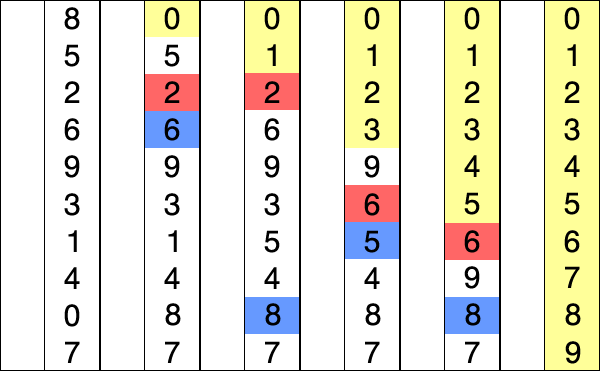
See the below image for better understanding
quicksort
Lets get hands on by writing a small Java code for Quick Sort.

import java.util.Arrays;

class QuickSort

{

    int partition(int arr[], int low, int high)

    {

        int pivot = arr[high];

        int i = (low-1);

        for (int j=low; j<high; j++)

        {

            if (arr[j] <= pivot)

            {

                i++;

                int temp = arr[i];

                arr[i] = arr[j];

                arr[j] = temp;

            }

        }


        int temp = arr[i+1];

        arr[i+1] = arr[high];

        arr[high] = temp;


        return i+1;

    }

    void mergeSort(int arr[], int low, int high)

    {

        if (low < high)

        {

            int pi = partition(arr, low, high);

            mergeSort(arr, low, pi-1);

            mergeSort(arr, pi+1, high);

        }

    }

    public static void main(String args[])

    {

        int arr[] = {10, 7, 8, 9, 1, 5};

        QuickSort qs = new QuickSort();

        System.out.println("Array before sort " + Arrays.toString(arr));

        qs.mergeSort(arr, 0, arr.length - 1);

        System.out.println("Array before sort " + Arrays.toString(arr));

    }
}

Analysis of Quick Sort

  • Time Complexity: O(nLogn) in all 3 cases (average and best) as merge sort always divides the array in two halves and take linear time to merge two halves.
  • Worst Case TC: O(n*n)
  • Worst Auxiliary Space: O(n)
  • Algorithmic Paradigm: Divide and Conquer
  • Sorting In Place: Yes
  • Stable: No


Hope you guys like it. Stay tune for more updates in sorting. Please comment for any doubts.
Happy Learning !!!

Merge Sort in Java

Merge Sort in Java
Till now we have discussed sorting algorithm which are though easy to code but are not really efficient when it comes to sorting a large set of objects e.g millions or billions of number. So we need some other algorithms we can be efficient in this case.
Till now the average time complexity of each sorting is O(n*n). Merge Sort has a complexity of O(nlog(n)) for average/worst case as well.

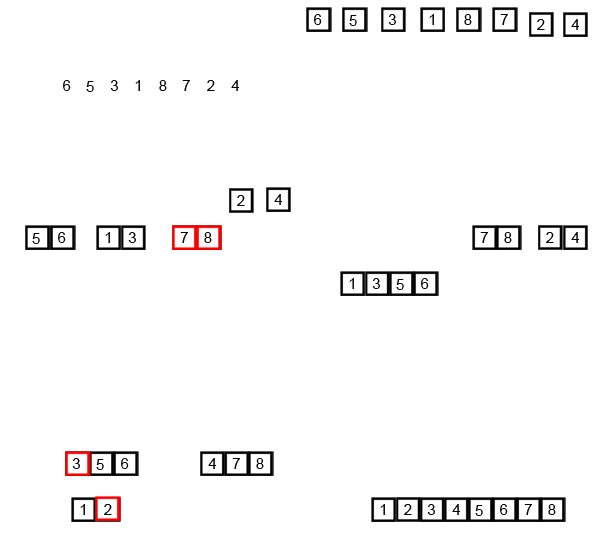
Merge Sort is based on divide and conquer algorithm. It divides the set in equal halves and sort each halves individually and then finally merge both the halves.

The algorithm can be summarized as below
MergeSort(arr[], left,  right)
If right > left
     1. Find the middle point to divide the array into two halves:  
             middle mid = (left+right)/2
     2. Call mergeSort for first half:   
             Call mergeSort(arr, left, mid)
     3. Call mergeSort for second half:
             Call mergeSort(arr, mid+1, right)
     4. Merge the two halves sorted in step 2 and 3:
             Call merge(arr, left, mid, right)
where merge() method is the key which merges the two equal halves assuming both are sorted.

Lets look at the below GIF for a better pictorial representation of Merge Sort

Merge-sort-example-300px.gif

So lets get hands on with Merge Sort by writing a Java Program as below.

import java.util.Arrays;


class MergeSort

{

    void merge(int arr[], int left, int mid, int right)

    {

        int n1 = mid - left + 1;

        int n2 = right - mid;


        int L[] = new int [n1];

        int R[] = new int [n2];


        for (int i=0; i<n1; ++i)

            L[i] = arr[left + i];

        for (int j=0; j<n2; ++j)

            R[j] = arr[mid + 1+ j];


        int i = 0, j = 0;

        int k = left;

        while (i < n1 && j < n2)

        {

            if (L[i] <= R[j])

            {

                arr[k] = L[i];

                i++;

            }

            else

            {

                arr[k] = R[j];

                j++;

            }

            k++;

        }

        while (i < n1)

        {

            arr[k] = L[i];

            i++;

            k++;

        }

        while (j < n2)

        {

            arr[k] = R[j];

            j++;

            k++;

        }

    }


    void mergeSort(int arr[], int l, int r)

    {

        if (l < r)

        {

            int m = (l+r)/2;

            mergeSort(arr, l, m);

            mergeSort(arr , m+1, r);

            merge(arr, l, m, r);

        }

    }


    public static void main(String args[])

    {

        int arr[] = {12, 11, 13, 5, 6, 7};

        MergeSort ms = new MergeSort();


        System.out.println("Array before sort " + Arrays.toString(arr));

        ms.mergeSort(arr, 0, arr.length-1);

        System.out.println("Array before sort " + Arrays.toString(arr));

    }

}
//output
//Array before sort [12, 11, 13, 5, 6, 7]
//Array before sort [5, 6, 7, 11, 12, 13]
Analysis of Merge Sort
  • Time Complexity: O(nLogn) in all 3 cases (worst, average and best) as merge sort always divides the array in two halves and take linear time to merge two halves.
  • Auxiliary Space: O(n)
  • Algorithmic Paradigm: Divide and Conquer
  • Sorting In Place: No in a typical implementation
  • Stable: Yes
Hope you like it. Stay tune for more interesting sorting algorithms.
Happy Learning !!!

Selection Sort in Java

Selection Sort in Java


Today we will discuss yet another sorting algorithm which also falls among the simplest and used heavily in beginner's level.
Selection Sort as the name suggests is based on the logic of finding the smallest elements among the compared elements in its phase.

Let me make it more clear by an example.

If given numbers are 2,5,3,4,1, in the first phase the smallest among the 5 numbers i.e 1 will be found and placed in the 1st position. In second phase we will compare the others elements and smallest among them i.e 2 will be placed in 2nd position. Like wise after the 5th phase all the 5 elements all being sorted.

You can also have a look on the below GIF for better understanding.


Let get hands on by writing a simple Java program to sort elements using Selection Sort.

import java.util.Arrays;

public class SelectionSort {

 public static void main(String[] args) {
        
        int arr[] = {12, 11, 13, 5, 6};
 
        SelectionSort ss = new SelectionSort();  
        System.out.println("Array before sort " + Arrays.toString(arr));
        ss.sort(arr);
        System.out.println("Array after sort " + Arrays.toString(arr));

 }

 private void sort(int[] list) {
  //First loop to change the index number
  for (int i = 0; i < list.length - 1; i++) {        // the last item doen't need to do the loop to compare
   // set the first item as index number
   int currentMin = list [i] ;
   int currentMinIndex = i;
   // second loop to do comparison with the number after it
   for (int j = i + 1; j < list.length; j++) { 
    // if there's number (that locates behind the index number) bigger than the index number
    if (currentMin > list [j] ) {

     // change the currenMin value to the new min number
     currentMin = list [j] ;

     // change the index
     currentMinIndex = j ;
    }
   } 
   // swap the value of the index number with the new min number
   if (currentMinIndex != i) {
    list [currentMinIndex] = list [i] ; 
    list [i] = currentMin ;
   }
  }
 }
}
Analysis of Selection Sort
  • Worst and Average Case Time Complexity: O(n*n). 
  • Best Case Time Complexity: O(n*n). Best case occurs when array is already sorted.
  • Auxiliary Space: O(1)
  • Sorting In Place: Yes
Hope you like it. Please stay tune as we will discuss some more interesting and efficient sorting algorithms in coming tutorial. Please comment on any doubts.

Happy Learning !!!